5 Plastic Editable Text Effects for Illustrator
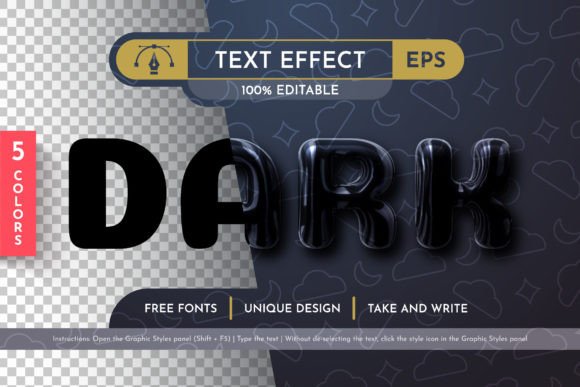
In the crowded landscape of digital design, a headline needs more than just bold typography to capture attention. It requires texture, depth, and a tactile quality that suggests premium production value. The 5 Plastic Editable Text Effects resource offers exactly this kind of visual punch. Designed specifically for Adobe Illustrator CC 2014 and all subsequent versions, this collection transforms flat type into vibrant, three-dimensional elements that pop off the screen or printed page. Whether you are crafting a retro-inspired poster, a modern app icon, or a striking marketing banner, these effects provide a foundational style that is both versatile and immediately usable.
The core appeal of this resource lies in its flexibility. Unlike rasterized images that degrade when resized, these effects are built entirely on vector data. This means you can scale your text from a tiny favicon to a massive billboard without losing a single pixel of clarity. For designers who frequently work across multiple platforms—from social media thumbnails to large-format signage—this scalability is not just a convenience; it is a necessity. The ability to manipulate size, rotation, and color instantly allows for rapid iteration during the creative process, keeping the workflow fluid and efficient.
Understanding the Vector Advantage
Many designers hesitate to use pre-made text effects because they often come locked down as complex groups or flattened layers. The 5 Plastic Editable Text Effects set breaks this barrier by ensuring every layer is organized and accessible. When you open the AI or EPS files, you will find a clean structure that mirrors professional file management standards. This organization is crucial for long-term project maintenance. If a client requests a color change three months after the initial design, you won't need to rebuild the effect from scratch. You simply adjust the fill properties of the specific vector paths.
The inclusion of Graphic Styles takes this utility a step further. By adding the plastic effect to your Graphic Styles panel, you create a reusable asset within your own library. Imagine working on a brand identity kit where consistency is key. With one click, you can apply the same glossy, dimensional finish to various headlines throughout a presentation or website mockup. This feature streamlines the design process significantly, allowing you to focus on composition and messaging rather than getting bogged down in repetitive styling tasks.
Creative Applications Across Industries
The versatility of these plastic text effects opens doors for a wide range of creative applications. For marketers and entrepreneurs, the bright and attractive nature of the effect makes it ideal for call-to-action buttons, promotional banners, and email headers. The glossy finish naturally draws the eye, increasing the likelihood that a user will engage with the content. In the realm of event planning and entertainment, these effects evoke a sense of fun and energy, perfect for concert posters, festival flyers, or party invitations. The "plastic" aesthetic often resonates well with themes related to technology, gaming, and youth culture.
Freelancers and small business owners can leverage these assets to elevate their branding without investing hours in learning complex 3D rendering techniques. A local coffee shop could use a warm, amber-toned variation of the effect for its seasonal menu highlights. A tech startup might opt for a cool, metallic blue version to convey innovation and reliability. Because the colors are easily changeable, the same base effect can be adapted to fit any brand palette, ensuring that the final output feels cohesive and custom-made rather than generic.
For educators and content creators, these effects offer a way to make educational materials more engaging. Headlines in e-books, course slides, or blog posts can benefit from the added dimensionality, breaking up walls of text and creating visual anchors for readers. The key is to use the effect sparingly but strategically, ensuring it enhances readability rather than distracting from the core message.
Practical Workflow and Customization
Integrating the 5 Plastic Editable Text Effects into your workflow is straightforward. Once you have imported the AI or EPS files into your project, you can expand the appearance if necessary to access individual anchor points. However, thanks to the organized layers, most adjustments can be made directly on the grouped objects. To change the color, select the main path and apply your desired hex code or gradient. The vector nature ensures that shadows, highlights, and reflections update dynamically, maintaining the illusion of depth regardless of the new hue.
When adapting these effects for print, it is essential to consider the output medium. While the vector format guarantees sharpness at any resolution, the specific colors should be converted to CMYK if the final product is for physical printing. The resource includes instructions to guide you through this process, ensuring that the vibrant screen colors translate accurately to ink. For digital projects, sticking to RGB will maximize the brightness and saturation of the plastic finish.
Consistency is another vital aspect of using pre-made effects. While the temptation may be to mix different styles from the pack, it is often more effective to choose one primary effect and vary only the color or slight geometric distortions. This approach creates a unified visual language across your project. For instance, if you are designing a series of social media graphics, applying the same plastic style to all headlines will establish a recognizable pattern that strengthens your brand identity.
Technical Specifications and Compatibility
This resource is meticulously prepared for users of Adobe Illustrator CC 2014 and later versions. The package includes five distinct AI files, five corresponding EPS files for broader compatibility, a dedicated Graphic Style file, and comprehensive documentation. The inclusion of EPS files is particularly valuable for those who collaborate with clients using older software or different design suites that support the Encapsulated PostScript format. Additionally, the help file and instruction guide ensure that even less experienced users can navigate the features without confusion.
Font usage is a critical component of any text effect. The resource provides clear information about the fonts used, allowing you to either install them locally or substitute them with your own typefaces while retaining the plastic styling. This flexibility means you are not restricted to a single typographic voice. You can experiment with bold sans-serifs for a modern look or decorative scripts for a playful feel, knowing the underlying effect will adapt seamlessly.
Finally, the creator's commitment to quality is evident in the invitation for feedback. Design resources are rarely perfect out of the box, and the willingness to address errors or shortcomings demonstrates a dedication to customer satisfaction. If you encounter any issues with the file structure or application, the support channel is open for communication. This level of engagement fosters a better experience for all users and ensures that the resource remains reliable over time.
Ultimately, the 5 Plastic Editable Text Effects represent a practical solution for designers seeking to add polish and professionalism to their typography. By combining technical robustness with artistic flair, this tool empowers creators to produce high-impact visuals efficiently. Whether you are refining a personal portfolio or delivering commercial work, these effects provide the spark needed to make your headlines truly shine.